Diners spend an average of 109 seconds with a restaurant menu. Those 109 seconds determine roughly 75% of revenue per cover — making menu design the single most influential marketing surface in any restaurant. Yet most operators still treat the menu as a price list, not a designed asset.
The classic principles of restaurant menu design — golden triangle, pricing psychology, category balance — haven't changed. What's changed is the time and cost of applying them. FineDine AI-powered menu tools have collapsed work that used to require a designer, a translator, and a food photographer into actions measured in seconds. Below are the principles that still matter, and how to operationalize them at scale.
1. What Restaurant Menu Design Actually Is — and Why It Moves Revenue
Restaurant menu design is the deliberate use of layout, typography, photography, and price presentation to shape what diners order. It's a behavioral instrument built on decades of consumer psychology research — not a price list.
Inside Cornell's 109-second window:
- The eye moves to specific zones automatically
- Prices written with currency symbols feel roughly 8% more expensive
- Photographed dishes are ordered close to 3x more often than non-photographed ones
Every menu design choice — font size, category order, line spacing — shapes revenue per cover.
2. The "Golden Triangle": Where to Place Your Highest-Margin Items
The golden triangle is the visual path a diner's eye takes when opening a menu: top-right corner first, top-left second, then page center. These three zones are the premium real estate of menu design.
Put your highest-margin items here — the signature pasta, the prime cut, the high-margin dessert. Lower-margin staples belong at the bottom of the page. This doesn't manipulate the diner; it ensures the items you most want them to see are the ones they see first.
In single-page menus the golden triangle sits top-right; in bifold menus, top of the right-hand page. The eye defaults to the right in Western reading cultures — exploiting that reflex costs nothing.
The advantage compounds in digital. Repositioning a dish on paper means a new print run; in FineDine Menu Manager it takes five seconds. Rotate hero items across positions and measure which version drives the most clicks — A/B testing that's structurally impossible on paper.
3. How to Write Prices on a Restaurant Menu
Three rules govern price formatting:
1. Drop the currency symbol. "$" or "AED" triggers spending awareness. Write just the number: "28". Cornell found this alone increased average check by roughly 8%.
2. Round numbers feel more premium. Write "60" instead of "59.99". The ".99" supermarket convention erodes fine-dining perception. It still works in casual segments; it backfires in upper-casual and fine dining.
3. Don't right-align prices in a column. Diners then scan price first, not dish — eyes default to the cheapest item. The price should sit at the end of the dish description, same font weight, slightly muted color.
Together these three adjustments move average check measurably — without changing a single ingredient.
Pricing is also the most frequently updated element of any menu. Paper means weeks of stale prices, hand-written corrections, or expensive reprints — all of which damage brand perception. With FineDine Menu Manager, a price change updates simultaneously across QR menu, website, Google Business Profile, and takeaway page.
4. How to Organize Menu Categories and How Many Items Each Should Hold
Five to seven items per category is the sweet spot. More than ten triggers decision fatigue — overwhelmed diners default to whatever they ordered last time, neutralizing the breadth of your menu.
Order categories along the meal arc: Appetizers, Soups, Salads, Mains (with sub-headings for meat / poultry / seafood / vegetarian), Desserts, Beverages.
Mark a "chef's pick" or "most ordered" in each category. These markers guide hesitant diners and quietly elevate higher-margin items.
Separate beverage menus from food menus where possible. When drinks live in a standalone card, diners order roughly 12% more beverages — they treat the choice as its own decision rather than an afterthought.
On paper, "which categories get the most attention" is intuition. In digital, it's a number. FineDine's menu analytics shows which categories open most often, which dishes get viewed but not ordered, and which day-parts drive which selections — turning category ordering and hero-item choice into evidence-based decisions.
5. How to Write Menu Descriptions That Lift Order Rates
Described dishes are ordered 27% more often than dishes listed by name alone (Iowa State University). Past 12 to 15 words the effect inverts — diners stop reading.
A strong description does three things:
- Uses sensory language: "crispy," "slow-roasted," "hand-pulled," "fresh-ground"
- References provenance: "wild-caught Norwegian salmon," "cold-press Mediterranean olive oil"
- Names the cooking method: "charcoal-grilled," "confit," "sous-vide"
"Chicken schnitzel" becomes "hand-pounded chicken schnitzel with fresh sage and lemon zest" — same dish, perceived as 22% more expensive.
Multilingual menus multiply this work. The same description in English, Arabic, and a regional language takes days and usually a translator. FineDine AI generates sensory-rich descriptions across every supported language from the dish name and a few key ingredients — in your brand voice.
6. How Food Photography Changes Ordering Decisions
Photographed dishes are ordered 30% more often than non-photographed ones — but only when the photo is high-quality. A poorly shot dish photo performs worse than no photo at all.
A good menu photo has:
- Natural or soft diffused light — never harsh flash
- Clean background — props that complement, not compete with, the plate
- 45° or 90° angle showing structure, not just the top of the plate
- Consistent style across the whole menu
Professional food photography traditionally needs a photographer and a stylist — $200-1,000 per dish, compounding to $5,000-30,000 for a 20-30 item menu. Seasonal menus mean repeating the spend.
FineDine AI-powered AI Media Studio rewrites this equation: it converts a raw phone photo into a polished menu image in seconds — cleaning the background, balancing light, correcting color. Generate variations and let menu analytics tell you which drives the most engagement.
7. Which Font Should You Use in Menu Design?
Font choice shapes perception as much as content. Two common mistakes: decorative fonts that don't read well, and three or four different fonts on one page.
The practical rule: one heading font, one body font, two type families maximum. Fine dining favors classic serifs (Garamond, Playfair Display); casual venues and cafés do better with clean sans-serifs (Inter, Montserrat). Body type should be at least 11pt.
Typography direction is accelerated in FineDine Website Builder, which uses FineDine AI prompts to generate starting layouts. Describe the concept — "minimal Mediterranean fine dining" or "playful neighborhood café" — and the system produces an initial design you refine from there. The same visual language carries from digital menu to website automatically.
8. Printed Menu vs. Digital QR Menu — Which Is Right for Your Restaurant?
Both formats are valid — they solve different problems. Printed menus reinforce perceived value; digital menus deliver operational speed. The table below shows where each performs better:
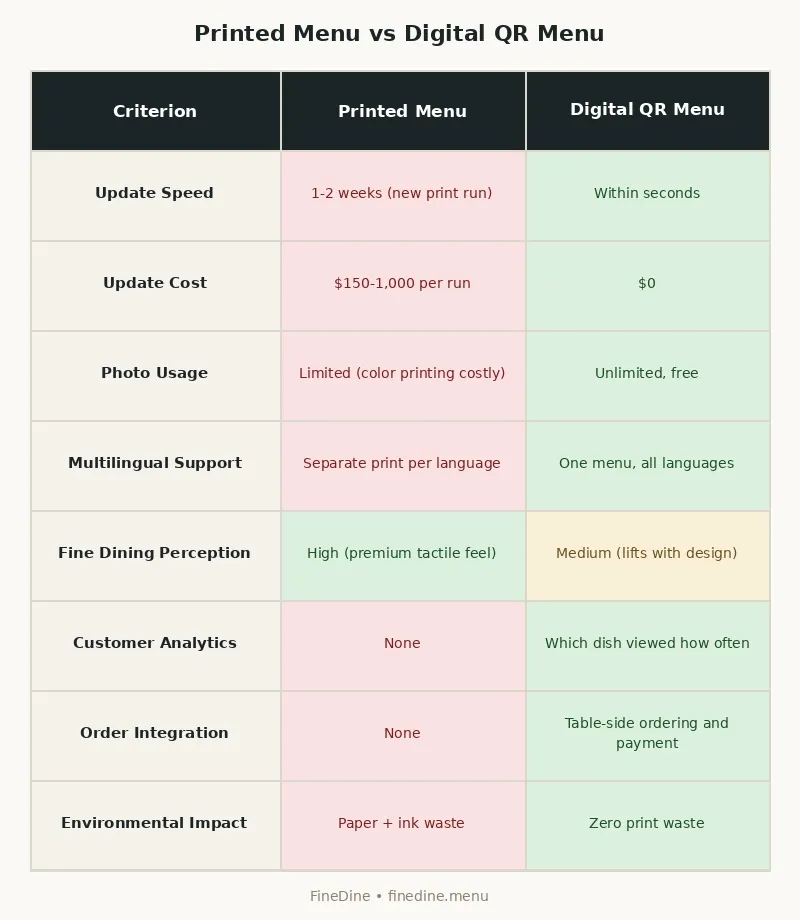
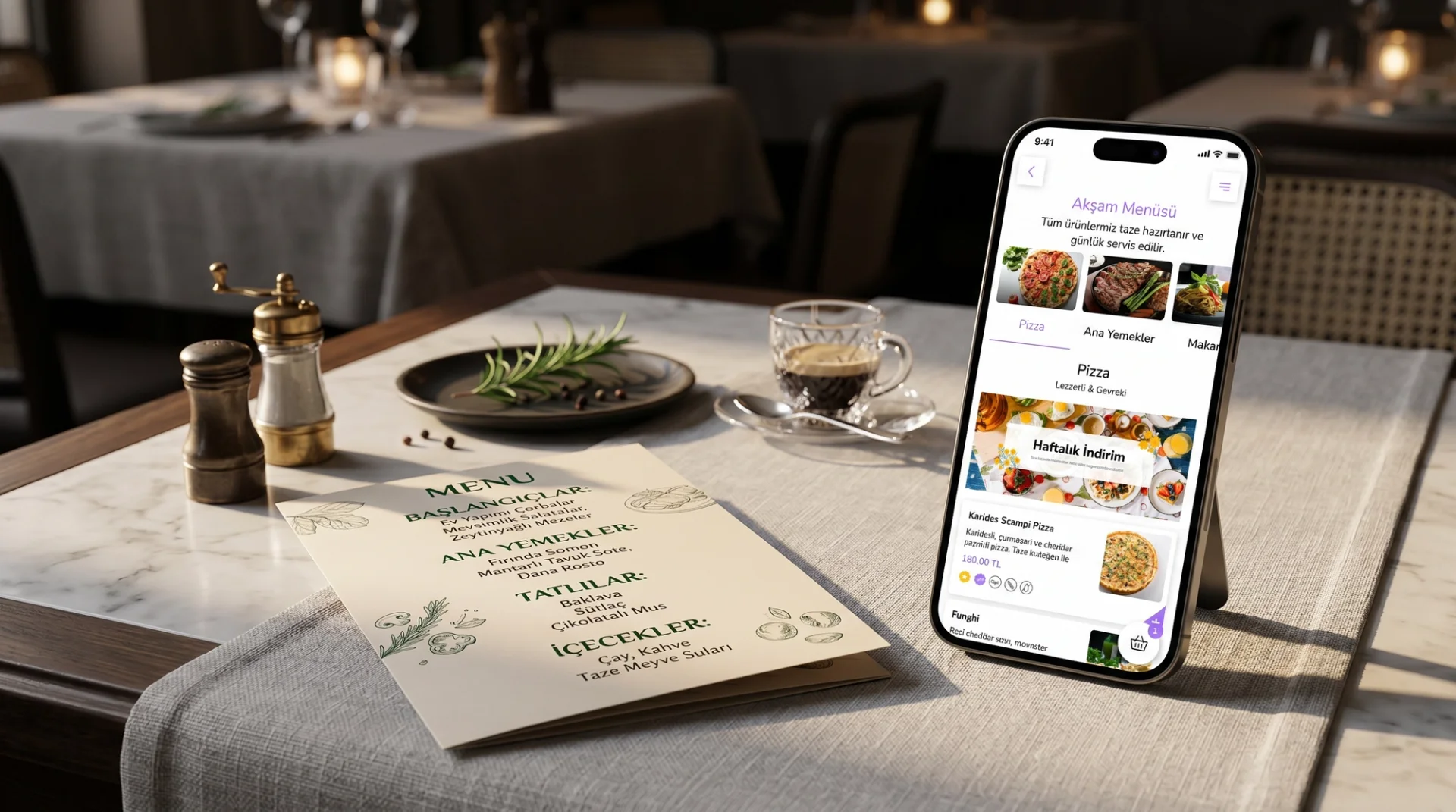
Most restaurants now run both: printed menus for dine-in main courses, QR menus for drinks, daily specials, allergens, and takeaway. Hybrid preserves the table experience and delivers operational speed.
A caveat: a QR menu is not a PDF. A real digital menu supports live price updates, "out of stock" flags, multilingual switching, and Google Business Profile integration. Without those, "digital" is paper on a screen.
Two menu systems in parallel create their own problem — prices update on one channel, not the other. FineDine Menu Manager fixes this at the source: one master menu definition pushes simultaneously to QR, print-ready PDF, website, and takeaway.
9. Where to Start with Restaurant Menu Design
Three practical steps:
Audit what you have. Which items sell the most, and which carry the highest margin? Where those overlap sits your hero menu — relocate those into the golden triangle.
Refresh visuals and descriptions. Each hero dish needs a high-quality photo and a sensory-rich description.
Build on a single-source digital stack. Updates — pricing, items, languages — should propagate to every channel from one place.
FineDine is built around this workflow. Menu Manager holds the master menu; price and item changes propagate to QR menu, website, and Google Business Profile in seconds. AI Media Studio turns existing dish photos into polished menu images; FineDine AI writes multilingual descriptions in your brand voice. Website Builder keeps the same menu live on your restaurant's website automatically.
Most operators get their first menu live on FineDine in 10 to 15 minutes. Demo or sign up at finedine.menu.