How Can I Change the Language of Printed Receipts?
Updated: September 22, 2026
If you are a current subscriber to FineDine Thermal printer integration and currently receiving printed receipts as below:
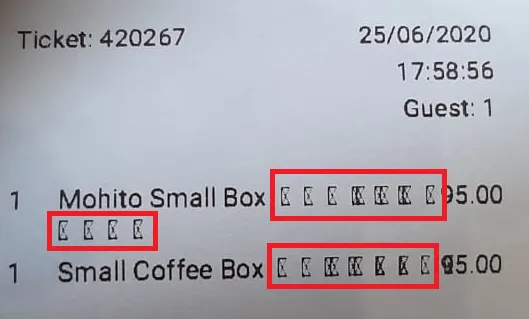
This indicates a mismatch between your Default Language and the alphabet used in your item texts. The default language indicates the font files used in the printer.
In the example above, the Default Language has been set as English, but the text on the items contained the item name in English and Arabic languages next to each other, which is why the system did not recognize the Arabic alphabet and replaced them with squares.
If the default language here were set to Arabic, the printer would have printed the Arabic language item texts and replaced the English ones with squares instead.
To overcome this issue, the default language and the alphabet used on the items should be matched.
For the system to work more efficiently, we would highly suggest you start utilizing our Translation Center rather than combining multiple languages on your item name or description.
Was this article helpful?
Related articles
Still need help?
Our support team is here for you. Start a chat and we'll get you an answer.