What is Venue Profile on the Tablet?
Updated: September 22, 2026
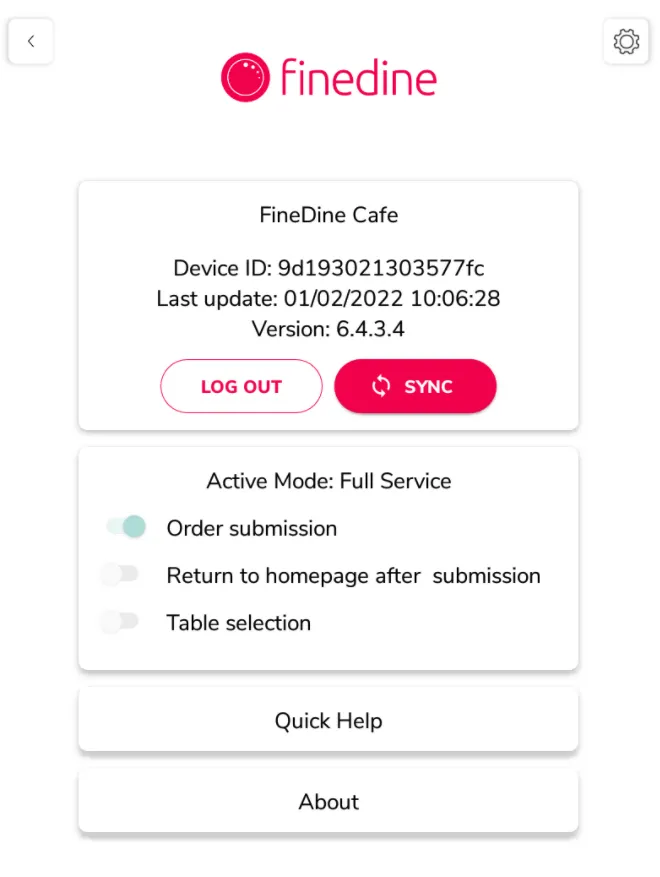
The Venue Profile screen on the FineDine Menu Tablet app is designed for the employees to check and update the menu without logging in to the Dashboard.
- You can access this screen by tapping three times on the FineDine logo at the bottom of the homepage.
If you've registered employees, they can access the page by entering their pin codes.
On this screen, you can;
- Log out / Log in from your account.
- Manually SYNC your menu to upload the latest updates from Dashboard.
- See the active order mode on your account.
- Get quick help from the Help Center by searching for the answer.
Was this article helpful?
Related articles
Still need help?
Our support team is here for you. Start a chat and we'll get you an answer.