The video formats taking over everyone's Reels feed can now star your food. Fifteen trending video templates just went live in AI Marketing Hub, each one built to show off your menu and your space. Pick a viral format, add your dish or your venue, and FineDine AI turns it into a video you can post in a few clicks.
1. What are trending video templates?
Trending video templates are restaurant-ready versions of the formats racking up views on social media. You choose the format and the dish; FineDine AI restages the scene around your food. No shoot, no editing, no gear.
2. Which templates are included?

The 15 templates fall into four groups:
- Viral scenes (10): Don't Stare, Rocket Ramp, Scooter Snatch, Wall Crash, Bro Filming, Sofa Dive, Stunt Save, Mini World, Too Good to Cut and Drip Feed.
- UGC (2): UGC Venue Visit and UGC Product Review, where a creator tours your venue or films a selfie review of your dish.
- CGI (2): Floating Fall and CGI Product Video, effects-driven spots with your product as the hero.
- Motion (1): Motion Graphic Poster, a bold animated poster in your brand colors.
Rocket Ramp sends your dish up a giant U-ramp, flips it through the air on rocket thrusters and sets it down in a cloud of smoke. In Bro Filming, the answer to "what is bro filming?" is your food. Drip Feed pours your sauce or drink right through the Instagram feed.
3. How do you use a trending video template?
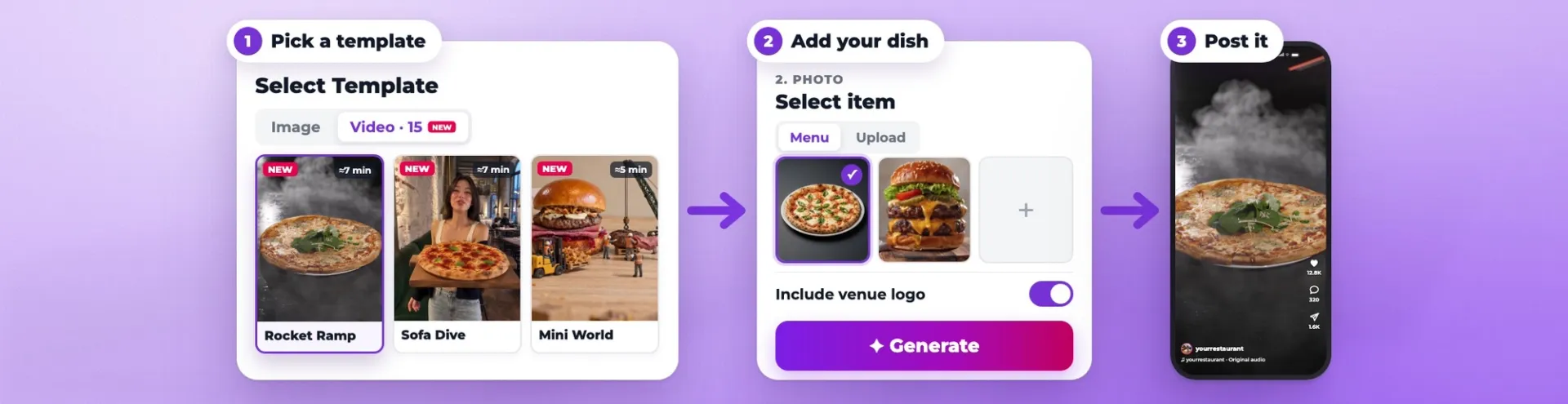
1. Pick a template. When you create a post in AI Marketing Hub, switch to the Video tab on the Select Template screen. Every card shows roughly how long the video takes (anywhere from 1 to 10 minutes) and how many credits it uses.
2. Add your dish. At 2. PHOTO, choose an item from your Menu or Upload a photo of your own. Turn on Include venue logo if you'd like, then hit Generate.
3. Post it. Once the video is ready, add a caption and hashtags and publish it to Instagram.
4. How can you try the templates?
All 15 are waiting in the Video · 15 tab of the AI Marketing Hub template picker. New to FineDine AI? Sign up and try them yourself.